OpenResty is a dynamic web platform that combines Nginx and LuaJIT. I have described it in detail in my previous article. To set it up and start coding, you can check it out here.
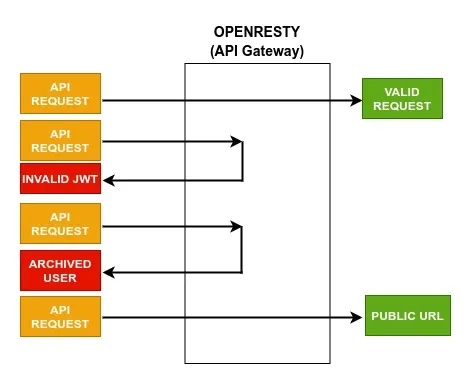
In this article, I would like to address a few enhancements which are essential to an API Gateway. They are as follows:
- Public URL Management
- Archive User
Public URL Management
In most systems, we have URLs that need to be exposed to the client and will not contain any token, like login APIs, etc. In this case, we would like our API Gateway to allow the URL and bypass any authentication.
To achieve this, we will be using Redis. It will store all the public URLs.
We are using this so that we can dynamically add/modify the public URL list.
Below screenshot shows the Redis key that contains the list of all public URLs:

local function check_public_api(ngx, api_str)
    -- Converts Redis API string to Lua table
    local api_table = get_api_table(api_str)

    if (api_table[ngx.var.uri] == "true") then
        return {
            ["status"] = true,
            ["message"] = "PUBLIC_API"
        }
    else
        -- Handle dynamic URLs
        for k,v in pairs(api_table) do
            local final_api_string = k:gsub("%:id", "%%w+")

            if (string.match( ngx.var.request_method .. ":" .. ngx.var.uri,
                              final_api_string) ~= nil) then
                return {
                    ["status"] = true,
                    ["message"] = "PUBLIC_API"
                }
            end
        end
    end

    return {
        ["status"] = false,
        ["message"] = "PRIVATE_API"
    }
end- Converts Redis String to a Lua Table to easily access the list.
- Checks whether the current URL is present in the Lua Table.
- In the case of dynamic URLs, the dynamic URL is converted to a regex string.
- After that, we check whether it is a part of Public API’s or not.
Archive User
This is useful in cases when a user has deactivated his/her account. In this case, you would want the user to not be able to access the system.
This can be easily handled in an API Gateway. All we have to do is to check whether a token belongs to the archived user. If it does, then give a 401 Unauthorized error from the gateway itself.
To achieve this, we will store the archived user in Redis. I am storing it in the form of ARCHIVED_(user_id).

function _M.is_user_allowed(self, ngx, redis_conn)
    -- Get JWT Token
    local jwt_token = helpers:fetch_jwt(ngx)
    if (jwt_token == nil or jwt_token == "") then
        return {
            ["status"] = false,
            ["message"] = "JWT_NOT_PRESENT"
        }
    end

    -- Fetch User ID from JWT Payload
    local jwt_payload_b64 = ngx.decode_base64(helpers:string_split(jwt_token, ".")[2])
    local jwt_payload = cjson.decode(jwt_payload_b64)
    local emp_id = jwt_payload["id"]

    -- Fetch User Record from Redis
    local emp_red_resp = redis_conn:get("ARCHIVED_" .. emp_id)
    if emp_red_resp == "true" then
        return {
            ["status"] = false,
            ["message"] = "USER_ARCHIVED"
        }
    end

    return {
        ["status"] = true,
        ["message"] = "USER_ACTIVE"
    }
end- Fetches the JWT token from the Authorization header.
- Decodes the JWT payload and fetches the user id.
- Checks whether the user id is present in Redis or not.
- If it is present, then it returns that the user is archived. Else, it returns that the user is active.
Final Thoughts
With this, you now have an API Gateway that allows public URLs and does not allow deactivated users to access the system.
We should check about the additional overhead that occurs with the addition of the above features. We should also perform load testing against our customize API gateway and compare the results with Nginx. That could be a discussion for another article.